 Hardware Ready Ready to Bench?
 Partecipiamo anche questa volta al lancio di una nuova scheda madre NZXT e questa volta il famoso produttore ha deciso di entrare nel mondo AMD. Lo fa con il chipset più venduto al momento, il B550! Questa soluzione permette all’utente di avere uno slot M.2 e uno PCIe 16X con velocità 4.0, mentre tutto il resto rimane con tecnologia 3.0.
Nzxt quindi entra nel mondo delle schede madri AMD con un prodotto che come potete vedere dalla prima foto punta forte sul design pulito. La N7 B550 è come la versione Intel su base Asrock, ma sono molti gli aggiustamenti estetici e non solo richiesti da NZXT al suo OEM.
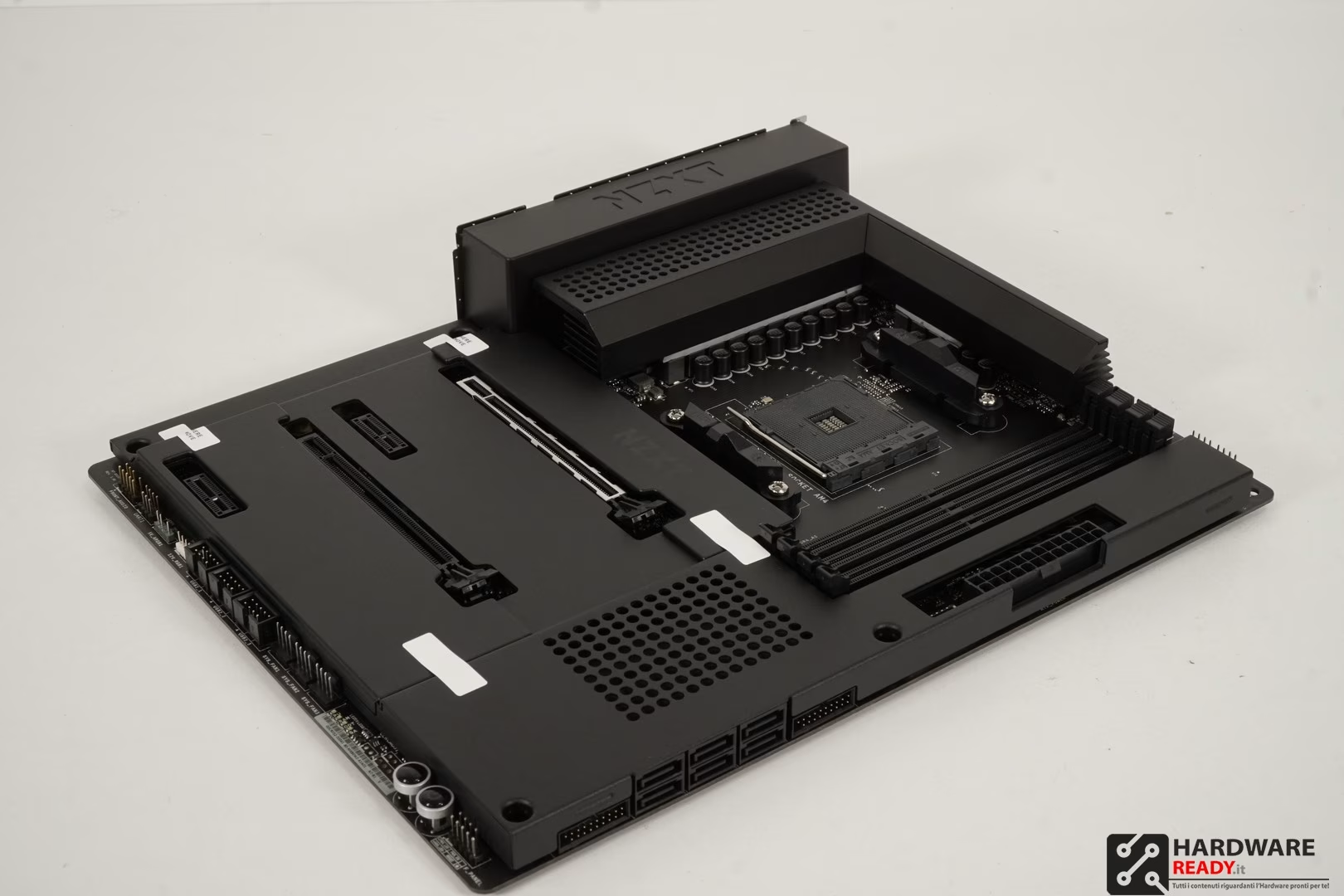 Il prodotto arriverà sul mercato a 229 dollari, quindi siamo difronte ad una B550 di fascia medio alta, sicuramente almeno per quanto riguarda il prezzo. In realtà vi anticipo che a questo giro il lavoro è stato meticoloso a 360 gradi, offrendo al cliente un prodotto bello da vedere ma comunque prestante.
Qui trovate il nostro video che vi mostra anche l’ecosistema creato dal produttore attraverso il software CAM.
Quick Facts about the N7 B550
- Our community heavily requested for us to make an N7 that supports AMD CPUs
- The N7’s iconic metal cover seamlessly blends into an NZXT H Series case allowing for your components to look stunning
- N7 B550 allows builders to simply build a gaming PC and get the most out of it
- PCIe gen 4 support
- Wi-Fi 6E and Bluetooth V5.2 connectivity
- Integrated NZXT CAM Support with fan controllers and create lighting profiles with support for RGB accessories across all manufacturers
- Optimal placement of ports for ease of building
- We worked with ASRock to create a motherboard based around AMD’s B550 chipset and to provide us with strong BIOS support
- We’ve taken in feedback from the N7 Z490 and added additional USB ports to the rear IO
- MSRP: $229.99
About the N7 B550
Designed around AMD’s B550 chipset, the N7 B550 delivers everything you need to build an incredible gaming PC. Features include built-in Wi-Fi 6E connectivity, integrated fan controller, RGB accessories supported across all manufacturers, and more. The motherboard cover perfectly matches the color and finish of your NZXT case, creating a visually seamless backdrop for your components.
Why did we design the N7 B550?
Our goal with the N7 is to create a seamless experience for PC gaming and building so that our customers can get the most out of their systems. That is why we chose to work with ASRock as our vendor that started with the N7 Z490 and now with the N7 B550. ASRock worked with us to ensure we were able to create a motherboard that supports the latest AMD’s CPUs with the proper connectivity and strong BIOS support.
The N7 is designed to provide builders with a simple building experience. Like the N7 Z490 before it, we worked to ensure that placement for essential ports are easily accessible for building and that we gave gamers the ideal specifications that they need to have an optimal experience. Additionally, the N7 B550 heightens the aesthetics of a build with its all-metal cover so that it can easily bring out the beauty of one’s build. Finally, the N7 B550 provides users with the ability to easily control their fan curves and lighting profiles with NZXT CAM so that they can tune their system for their needs.
What’s New N7 B550
| N7 B550
AMD B550 ATX Motherboard |
N7 Z490
Intel Z490 ATX Motherboard |
| CPU Phases:
12+2 6 |
CPU Phases:
8+2 4 |
| Full Cover:
Included |
All-Metal Cover:
Included |
| Integrated Rear I/O Shield | Integrated Rear I/O Shield |
| Fan Channels and Support:
1x for CPU fan(s), 2A 1x for AIO pump, 2A 5x for System fans, 2A each |
Fan Channels and Support:
1x for CPU fan(s), 2A 1x for AIO pump, 2A 5x for System fans, 2A each |
| M.2 Slots for Storage:
1x PCIe 4.0 1x PCIe & SATA |
M.2 Slots for Storage:
1x PCIe 3.0 1x PCIe & SATA |
| Lighting Channels and Support:
2x for NZXT RGB, 1x 5V 3-pin ARGB, |
Lighting Channels and Support:
2x for NZXT RGB, 1x 5V 3-pin ARGB, |
| USB Ports and Headers:
3x USB 3.2 Gen 2(rear I/O) 1x USB 3.2 Gen 2 (rear Type-C) 4x USB 3.2 Gen 1(rear I/O) 2x USB 2.0 (rear I/O) 1x USB 3.2 Gen 2(USB Type-C at mid-board) 2x USB 3.2 Gen 1 (at mid-board) 6x USB 2.0 (at mid-board) |
USB Ports and Headers:
1x USB 3.2 Gen 2(rear I/O ) 1x USB 3.2 Gen 2 (rear Type-C) 2x USB 3.2 Gen 1(rear I/O) 2x USB 2.0 (rear) 1x USB 3.2 Gen 2(USB Type-C at mid-board) 2x USB 3.2 Gen 1 (at mid-board) 6x USB 2.0 (at mid-board) |
| Wireless & Bluetooth:
Intel Wi-Fi 6E, Bluetooth V5.2 |
Wireless & Bluetooth:
Intel Wi-Fi 6, Bluetooth V5.1 |
Main Highlights
- SMART CONTROLS
The N7 B550 includes key features from our RGB and Fan Controller, allowing intuitive control of four RGB lighting channels and seven fan channels through CAM. Lighting accessories from all manufacturers are supported.
- STUNNING CRAFTSMANSHIP
The N7’s white or black covers provide a clean design that blends seamlessly with your case.
- BUILDING MADE EASIER
The N7 B550 includes Wi-Fi 6E connectivity and utilizes all PCI express lanes available from the CPU and chipset. The N7’s layout streamlines installation with an integrated rear I/O shield and optimally placed headers for easier setup.
Features
- Designed with AMD® B550 Express Chipset
- Supports 3rd Gen AMD™ Ryzen™ processors (3000, 4000, and 5000 Series Processors)
- 12+2 DrMOS Power Phase Design
- Intel® Wi-Fi 6E wireless connectivity and Bluetooth V5.2
- Two M.2 connectors for storage devices
- Supports memory overclocking speeds of up to 4733MHz and XMP
- 8-channel high-definition audio
NZXT N7 B550 Links
Product Page: Link (Live on 3/25)
Official Press Release: Link (Live on 3/25)
CPU Support List: Link
Memory QVL: Link
CAM Download: Download Here
Driver Download: Link
N7 B550 Technical Specifications
| CPU & Socket | Supports AMD Socket AM4 Ryzen™ Processors (3000, 4000, and 5000 Series Processors) *
* Not compatible with AMD Ryzen™ 5 3400G and Ryzen™ 3200G |
| Chipset | AMD® B550 |
| Memory | 4 x DIMM, Max. 128GB, DDR4
Dual-channel memory architecture – AMD Ryzen series CPUs (Vermeer) support DDR4 4666+(O.C.)/ 4600(O.C.)/ 4533(O.C.) /4466(O.C.)/ 4400(O.C.)/ 4333(O.C.)/ 4266(O.C.)/ 4200(O.C.)/ 4133(O.C.)/ 4000(O.C.)/ 3866(O.C.)/ 3800(O.C.)/ 3733(O.C.)/ 3600(O.C.)/ 3466(O.C.)/ 3200/ 2933/ 2667/ 2400/ 2133ECC & non-ECC, un-buffered memory* – AMD Ryzen series CPUs (Matisse) support DDR4 4666+(O.C.)/ 4600(O.C.)/ 4533(O.C.) /4466(O.C.)/ 4400(O.C.)/ 4333(O.C.)/ 4266(O.C.)/ 4200(O.C.)/ 4133(O.C.)/ 4000(O.C.)/ 3866(O.C.)/ 3800(O.C.)/ 3733(O.C.)/ 3600(O.C.)/ 3466(O.C.)/ 3200/ 2933/ 2667/ 2400/ 2133 ECC & non-ECC, un-buffered memory* – AMD Ryzen series APUs (Renoir) support DDR4 4733+(O.C.)/ 4666(O.C.)/ 4600(O.C.)/ 4533(O.C.) /4466(O.C.)/ 4400(O.C.)/ 4333(O.C.)/ 4266(O.C.)/ 4200(O.C.)/ 4133(O.C.)/ 4000(O.C.)/ 3866(O.C.)/ 3800(O.C.)/ 3733(O.C.)/ 3600(O.C.)/ 3466(O.C.)/ 3200/ 2933/ 2667/ 2400/ 2133 ECC & non-ECC, un-buffered memory* – Support Extreme Memory Profile (XMP) memory modules – 15μ Gold Contact in DIMM Slots
Please refer to Memory QVL on NZXT’s website (www.nzxt.com) for more information. |
| Expansion Slots | AMD Ryzen Series CPUs (Vermeer)
2 x PCIe x16 Slots (PCIe1: Gen4x16 mode; PCIe3: Gen3 x4 mode) AMD Ryzen Series CPUs (Matisse) 2 x PCIe x16 Slots (PCIe1: Gen4x16 mode; PCIe3: Gen3 x4 mode) AMD Ryzen Series CPUs (Renoir) 2 x PCIe x16 Slots (PCIe1: Gen3x16 mode; PCIe3: Gen3 x4 mode) – Supports AMD Quad CrossFireX™ and CrossFireX™ – Supports NVMe SSD as boot disks 2 x PCIe 3.0 x1 Slots 1 x M.2 Socket (Key E), supports type 2230 WiFi/BT module |
| Integrated Graphics | Integrated AMD Radeon™ Vega Series Graphics in Ryzen Series APU*
* Actual support may vary by CPU – DirectX 12, Pixel Shader 5.0 – Shared memory default 2GB. Max Shared memory supports up to 16GB with 32GB system memory installed. – Supports HDMI 2.1 with max. resolution up to 4K x 2K (4096×2160) @ 60Hz, HDR and HDCP 2.3 – Supports Microsoft PlayReady® |
| Storage | AMD® B550 Chipset
1 x M2_1: M.2 type 2242/2260/2280 (PCIe 4.0 x4 mode (with Mastisse & Vermeer) or PCIe 3.0 x4 (with Renoir)) 1 x M2_2: M.2 type 2242/2260/2280 (PCIe 3.0 x2 & SATA mode) 6 x SATA 6Gb/s ports* – Support RAID 0/1/5/10, NCQ, AHCI and Hot Plug * M2_2 and SATA3_5_6 share lanes. |
| LAN | Realtek® RTL8125BG 2.5G LAN |
| Wireless | Intel Tri Band Wireless-AX210 Wi-Fi 6E
Wi-Fi 802.11 a/b/g/n/ax – Support tri-band frequency 2.4/5GHz/6GHz – Support MU-MIMO |
| Bluetooth | Bluetooth V5.2 |
| Audio | Realtek® ALC1220 Codec
– 8-Channel High Definition Audio, 32-bit /192KHz DAC – 120dB SNR DAC with Differential Amplifier – NE5532 Premium Headset Amplifier for Front Panel Audio Connector (Supports up to 600 Ohm impedance headsets) – Nichicon Fine Gold Series Audio Capacitors – 15μ Gold Audio Connector and Gold Audio Jacks |
| USB Ports | 3 x USB 3.2 Gen 2 ports (3 at back panel)
1 x USB 3.2 Gen 2 Type-C (at back panel) 1 x USB 3.2 Gen 2 front panel port (For USB Type-C) 8 x USB 3.2 Gen 1 ports (4 at back panel, 4 at mid-board) 8 x USB 2.0 ports (2 at back panel, 6 at mid-board) |
| Rear I/O | 2 x USB 2.0 ports
3 x USB 3.2 Gen 2 port 1 x USB 3.2 Gen 2 Type-C port 4 x USB 3.2 Gen 1 ports 1 x HDMI™ port 2 x Wireless antenna SMA connectors 1 x Clear CMOS button 1 x BIOS Flashback button 1 x LAN (RJ45) port 1 x Optical S/PDIF Out port 1 x 5.1-Channel audio jacks |
| Internal I/O | 1 x 24-pin ATX power connector
1 x 8+4-pin ATX 12V power connector 1 x 4-pin CPU_FAN connector1 1 x 4-pin AIO_PUMP connector2 5 x 4-pin SYS_FAN connectors2 2 x NZXT RGB LED connectors3 1 x 5V ARGB LED connector4 1 x 12V RGB LED connector5 3 x USB 2.0 header (Up to 6 USB 2.0 ports) 2 x USB 3.2 Gen1 header (Up to 4 USB 3.2 Gen 1 ports) 1 x USB 3.2 Gen2 front panel header (For USB Type-C) 6 x SATA 6Gb/s connectors 1 x M.2 Socket 3 with M Key, type 2242/2260/2280 storage device support (PCIe 4.0 x4 mode (with Mastisse & Vermeer) or PCIe 3.0 x4 (with Renoir)) 1 x M.2 Socket 3 with M Key, type 2242/2260/2280 storage device support (PCIe 3.0 x2 & SATA mode) 1 x M.2 Socket 1 with E Key, (For wireless cards) 1 x Front panel audio connector 1 x Power button 1 x Reset button 4 x POST LEDs
|
| Accessories | 1 * User’s manual
4 * SATA cables (2 * 90 degree, 2 * 180 degree) 2 * Wireless antenna 2 * M.2 screws |
| Operating System | Microsoft® Windows® 10 (64-bit) |
| Form Factor | ATX |
| Dimensions | 305 x 244 x 43mm |
| Certifications | FCC, CE, KCC, BSMI, ErP/EuP Ready |
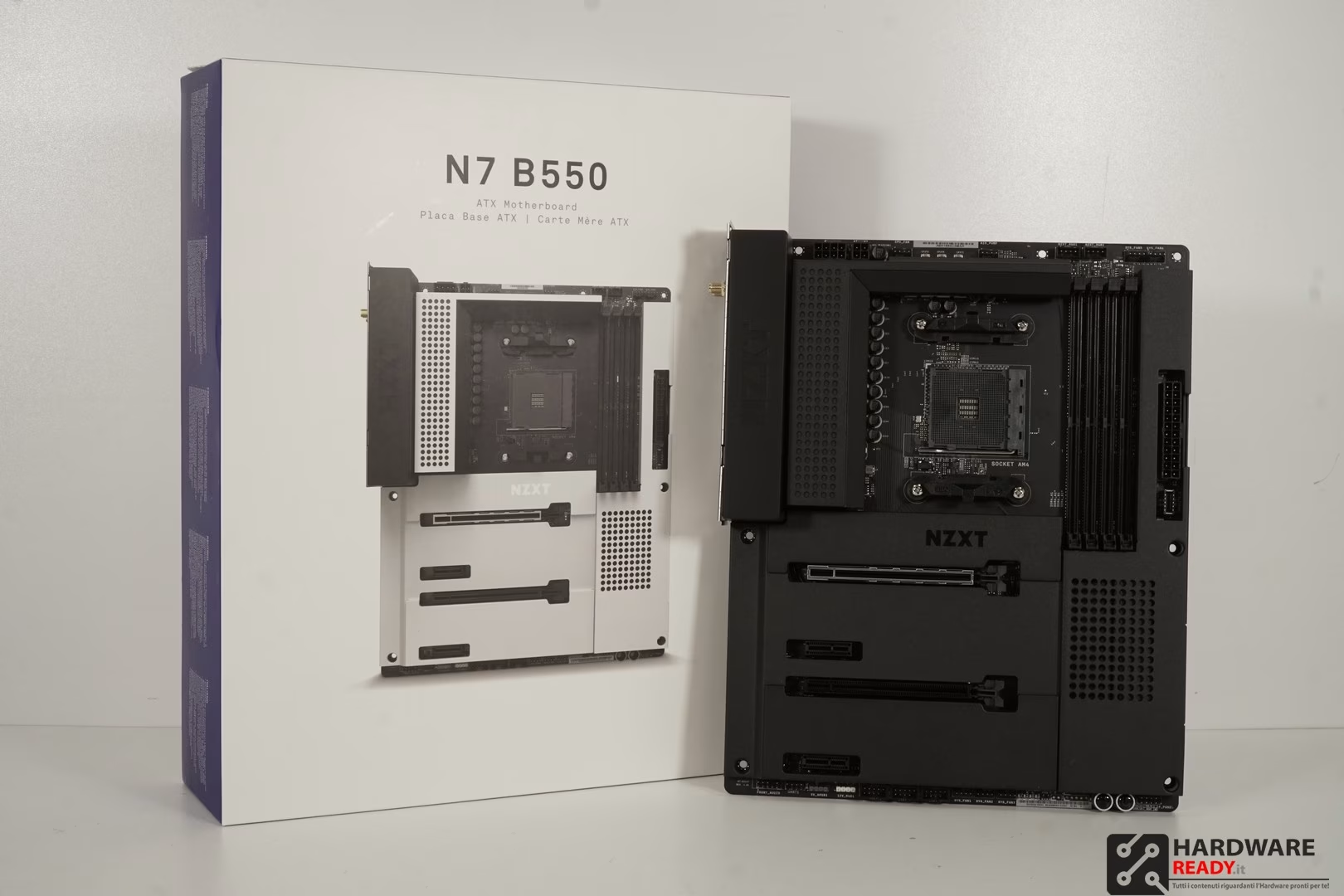
La confezione è in pieno stile NZXT e ci mostra già che il prodotto arriverà in due colorazioni. Speriamo inoltre che vengano rese disponibili anche altre armature per personalizzare completamente la scocca.


La scocca in nero ricopre quasi completamente la scheda madre rendendo il design unico nel suo genere. Il produttore ha nascosto tutto quello che poteva nascondere e devo dire che è una cosa che mi piace e anche tanto. Gli adesivi che ho lasciato appositamente sono utilizzati per permettere alle cover degli M.2 di non staccarsi durante il viaggio.
Segnalo una pecca in questo sistema, ma va considerata bene. Le due cover sopra le porta M.2 non fungono da dissipatori, non hanno contatto quindi con le periferiche M.2 che andrete a montare. Quindi se andrete a montare degli NVME vi converrà comprarli con dissipatore al seguito, sappiamo quanto questi tendano a scaldare. D’altro canto se avreste comunque optato per unità con dissipatore incorporato avreste avuto problemi con le cover se fossero andate a contatto con essi. Quindi come sempre dipende.
Proseguiamo, nella parte alta troviamo i due dissipatori atti a raffreddare i VRM, la nostra scheda vanta un design a 12 + 2 fasi, quindi capace di affrontare anche i più prestanti Ryzen 5000 senza nessun problema. L’alimentazione per la CPU è distribuita su un 4 + 4 e un ulteriore 4 pin, cosi da avere tutta la corrente necessaria anche per le CPU 16 core.
La scheda madre sempre nella zona alta vanta due connettori NZXT RGB, per collegarci direttamente i controller compatibili del produttore. Tale scelta punta a creare un ecosistema completo ed una integrazione avanzata tra i prodotti NZXT.
La connettività è ottimo internamente, troviamo una USB C, due porte per due USB 3.2. Tre porte per due USB 2.0 e non mancano i connettori classici per led da 12V e 5V.
Possiamo rimuovere i due coperchi nella zona PCI per andare a vedere dove si trovano le due porte M.2. Da questo punto di vista la scheda madre vanta una connettività completa che sicuramente non sfigura difronte alle dirette concorrenti.


Anche sul pannello frontale abbiamo un ottima connettività, con Wifi 6 e porta LAN da 2.5G.


Il software CAM continua a migliorare, è suo l’arduo compito di creare un ecosistema completo tra i prodotti NZXT.
Dobbiamo dire che il lavoro svolto dal produttore da questo punto di vista continua ad essere tanto e siamo sicuri che si può sicuramente migliorare e offrire ancora di più ai propri clienti. Grazie a questo unico software si riesce ad ottenere un controllo completo su CPU, RAM, scheda video e illuminazione. Avere meno software possibili installati vi permetterà di andare incontro a meno problemi di instabilità.


Il Bios, che è la prima cosa che mi ha fatto comprendere chi fosse l’OEM è semplice e abbastanza ordinato. Abbiamo pieno controllo sui voltaggi e sulle frequenze di CPU e RAM, possiamo impostare RAID e tutto il resto.
La scheda madre poi si è comportata bene anche nei nostri test in overclock. Gestendo perfettamente la frequenza su diversi CCX. Inoltre anche i profilo XMP delle nostre RAM hanno funzionato senza problemi o nostri interventi.


Test.
Cinebench.
Più alto è meglio.
Proseguiamo con il benchmark di HWR basato su blender.
Più basso è meglio.
Passiamo a Wprime 1024.
Più basso è meglio.
Aida Suite.
Più alto è meglio.
CPU-Z Benchmark.
Più alto è meglio.
Overclock.
Il design a 12 + 2 fasi lavora egregiamente permettendoci di raggiungere overclock simili a quelli ottenuti con tutte le altre B550 che abbiamo testato. A questo giro con la N7 B550 possiamo dire che non ci sono problemi dovuti al bios per quanto riguarda la stabilità e il Vcore applicato viene gestito in modo stabile e preciso.
Con 1.3 V siamo riusciti a tenere il nostro 3950X, un 16 core di precedente generazione, a 4400 Mhz sui primi due CCX e 4300 Mhz sugli utlimi due CCX. Un risultato simile a quello visto su schede madri di altri produttori. Tale segno sicuramente ci lascia comprendere che il produttore ha lavorato bene.
Siamo giunti alla fine della nostra recensione, la NZXT N7 B550 è una scheda madre di buon livello che speriamo di vedere nel nostro mercato intorno ai 200 euro. Il prodotto è uno dei pochi ad offrire la possibilità di cambiare scocca e quindi una personalizzazione avanzata rispetto alle altre schede madri. Il produttore ha optato per un design privo di Led, questo sicuramente farà gola a quella parte di appassionati che predilige prodotti dall’aspetto serio.
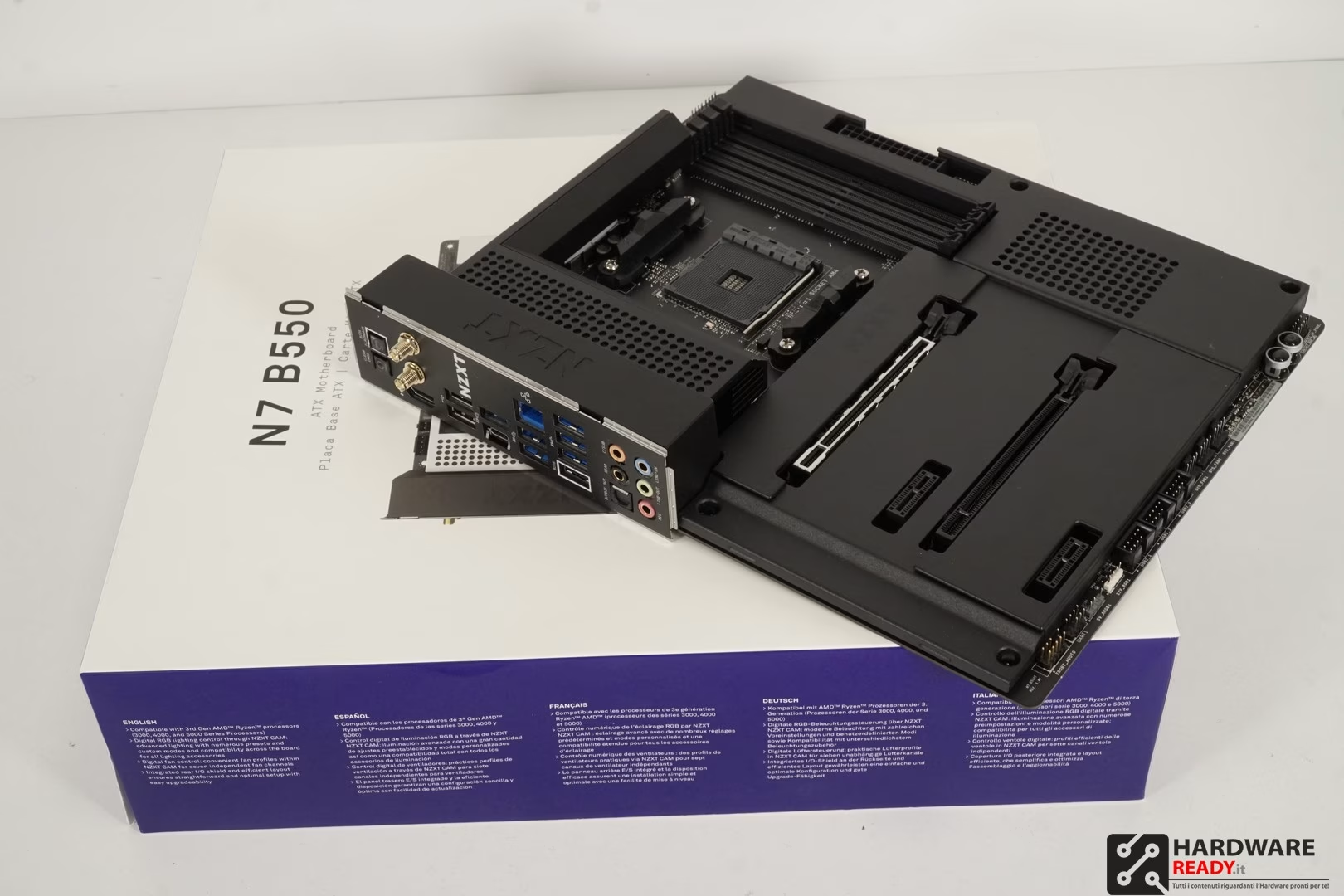 La scheda madre vanta una buona e completa connettività, onestamente da questo punto di vista non so cosa altro si potesse aggiungere su un prodotto del genere. Allo stesso tempo abbiamo fatto notare la mancanza di dissipazione sugli M.2 che reputiamo una cosa necessaria, visto quanto questi tendino a scaldare. Ma a questo la soluzione è alquanto semplice.
Gradito lo sforzo di creare un ecosistema, una strada vincente che diversi brand hanno deciso di seguire. Offrire un senso all’acquisto di prodotti tutti dello stesso marchio è una strategia di marketing vincente, soprattutto quando giustificata da buoni prodotti.
Concludiamo, siamo convinti che NZXT possa far bene anche nel mondo delle schede madri. La N7 B550 è una chiara testimonianza che si possono offrire molte cose ai propri utenti senza dover strafare.